
Blog

Workelect vs Jobber: Which Field Service Software Is Right for You?

20 Apr 2026 - 4 min read - Workelect Team

Introduction

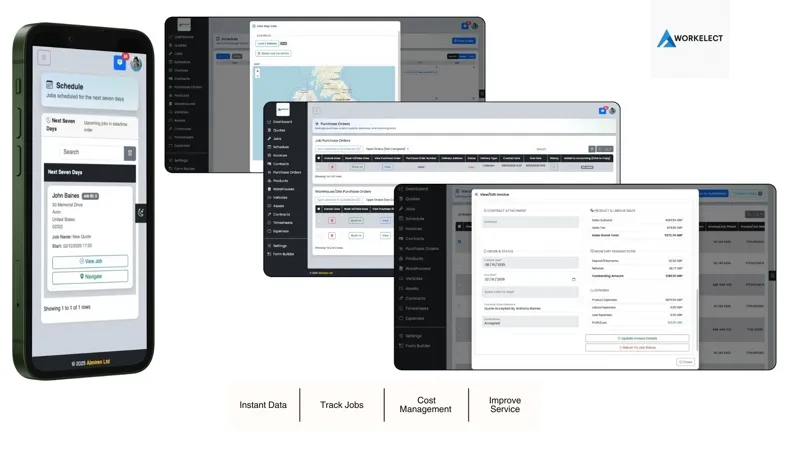
Workelect field service jobs, stock, and operations dashboard - Almiren bespoke builds

If you are comparing Workelect and Jobber, you are likely deciding between keeping things simple or preparing for growth and complexity.

Both platforms help you manage jobs, schedule work, and run a field service business, but they are built for very different stages and operational needs.

The real question is this: do you need something easy to get started with, or something built to handle operational scale?

If you are weighing the wider field service management software market, it helps to think about both where your business is today and what it will need as it grows.

Quick summary

  • Choose Workelect if you need inventory control, asset tracking, and operational visibility as you grow.
  • Choose Jobber if you want a simple, easy-to-use tool for managing jobs and customers.

Who Workelect is for

Workelect is designed for growing service businesses dealing with increasing operational complexity.

  • Teams managing stock across vans and warehouses.
  • Businesses with multiple engineers or crews.
  • Operations that need tighter coordination between jobs, parts, and assets.

Businesses exploring field service inventory management, van stock management software, and warehouse and van stock management are typically closer to Workelect's strengths.

In short: scaling, inventory-heavy operations.

Who Jobber is for

Jobber is generally aimed at smaller service businesses that want speed, simplicity, and a straightforward way to manage work.

  • Solo tradespeople or small teams.
  • Businesses moving away from spreadsheets or manual processes.
  • Users who want an easy way to manage jobs, quotes, and invoicing.

In short: small, service-focused teams.

Scheduling and job management

Both platforms let you schedule jobs, assign work, and track progress.

The difference is what surrounds the job. Jobber focuses on ease of use and quick setup, while Workelect focuses on linking scheduling with operational readiness, including stock, assets, and field execution.

For teams comparing scheduling depth, it is also worth looking at Workelect's approach to field service scheduling software and dispatch software.

For basic job management, both platforms can work well, but they serve different levels of operational complexity.

Inventory and stock control

This is where the gap becomes clear.

  • Workelect offers full warehouse and van stock tracking.
  • Workelect gives teams real-time inventory visibility.
  • Workelect is built to ensure jobs have the right parts available before work starts.
  • Jobber has more limited inventory functionality and is not designed for managing stock across multiple locations.

If your business depends on parts and equipment, this becomes a key difference. You can explore more on field service parts inventory, service parts management, and our related article on van stock app benefits.

Quoting, invoicing, and customer management

Jobber is stronger when your priority is quoting, invoicing, and customer tracking for a simpler service business workflow.

Workelect is more focused on operations, assets, logistics, and job readiness than on front-end sales and invoicing workflows.

If you are comparing specialist stock and operations control against lighter all-in-one job tools, our Workelect vs generic field service software comparison is another helpful reference point.

Ease of use and setup

The trade-off here is simplicity versus scalability.

AreaWorkelectJobber
Setup timeMediumVery low
Learning curveModerateVery easy
FlexibilityMediumLimited

Jobber is significantly easier to pick up and use, and that is one of its main advantages.

The real difference

At a surface level, both tools help you manage jobs. But they are built for different business realities.

  • Jobber helps you run a simple service business efficiently.
  • Workelect helps you manage complexity as your operation grows.

That means Jobber is a strong fit when things are straightforward, while Workelect becomes more valuable when coordination, stock, and operational scale start to matter.

When to choose Workelect

  • You manage stock across vans and locations.
  • Jobs are delayed because of missing parts or poor coordination.
  • You have multiple engineers or teams in the field.
  • Your business is growing and becoming harder to manage.

When to choose Jobber

  • You are a small team or solo operator.
  • You want a simple, intuitive system.
  • You need quoting, invoicing, and customer tracking.
  • Your operations are still relatively straightforward.

Pros and cons

Workelect

Pros

  • Strong inventory and asset tracking.
  • Built for scaling operations.
  • Real-time visibility across jobs and stock.

Cons

  • More complex than simple FSM tools.
  • May be unnecessary for smaller teams.

Jobber

Pros

  • Very easy to use.
  • Strong quoting and invoicing features.
  • Quick setup.

Cons

  • Limited inventory capabilities.
  • Not designed for complex or multi-layer operations.

Final verdict

This comparison comes down to simplicity versus scalability.

Choose Workelect if you need control, visibility, and operational depth as your business grows.

Choose Jobber if you want a simple, effective way to manage jobs and customers.

Jobber helps you run your business today. Workelect helps you run your business as it becomes more complex.

Choosing the right tool depends on where you are and where you are heading next. If you want to explore more, start with Workelect, browse the wider Workelect blog, or read our other comparisons on Workelect vs ServiceM8 and Workelect vs Joblogic.

FAQ

Workelect is usually the stronger fit for growing teams that need more operational control over stock, assets, and coordination.

Jobber is generally a better fit for smaller teams that want a straightforward way to manage jobs, quotes, invoices, and customers.

Yes. Both platforms support core scheduling and job tracking, but they are aimed at different levels of complexity.

The clearest difference is operational depth: Workelect is better suited to growing, stock-heavy operations, while Jobber is better suited to simpler service workflows.

Share

Share this blog post

Related posts

20 Apr 2026 - 4 min read

Best Field Service Management Software (FSM) in 2026: Complete Comparison Guide

A UK-focused guide to the best field service management software in 2026, comparing simple, mid-market, and enterprise FSM tools.

Read more ->

20 Apr 2026 - 5 min read

Workelect vs Tradify: Which Field Service Software Is Right for You?

A practical comparison of Workelect and Tradify across job management, inventory control, quoting, and operational scale.

Read more ->

20 Apr 2026 - 5 min read

Workelect vs Workever: Which Field Service Software Is Right for You?

A practical comparison of Workelect and Workever across job management, inventory control, invoicing, and operational scale.

Read more ->